 Scientific documents with troff eqn
Add mathematics to your scientific documents with troff eqn
Many technical writers may think of TeX or LaTeX for scientific writing that requires equations. But the Unix troff system supported equations long before Knuth created TeX in 1978, and before Lamport wrote the LaTeX macros in 1984.
Lorinda Cherry and Brian Kernighan (both from AT&T Labs) wrote a
1975 article in the Communications of the ACM about a
pre-processor for troff called eqn, describing it
as a system for
typesetting mathematics.
The eqn pre-processor used
natural language which made it easy to use, even for very complicated
equations.
Let's look at an example document I wrote that demonstrates how to
format equations with eqn, using the GNU groff implementation.
You can install GNU groff on any modern computer system, including Mac
and Windows, although it is most frequently associated with Unix-like
systems such as Linux.
A sample document
I recently worked on a hobby project that required drawing an equilateral triangle in a 640×480 display. The triangle needed to be centered on the display, which meant the top of the triangle was easily positioned at the top-center of the screen. But what should be the coordinates for the other two corners?
I started by writing a document in GNU groff, and drawing a
diagram with pic. I formatted my document with the
ms macros, just as authors might do at AT&T Labs in the
1970s and 1980s:
.ds FAM N
.nr PS 14
.TL
Drawing an equilateral triangle
.LP
Start with this representation of an equilateral triangle in a 640\[mu]480
display. (That's a 4:3 aspect ratio.) The triangle in the diagram doesn't
need to be exactly to scale, it can be approximate.
.PS
box dotted wid 4 ht 3;
line "c " rjust from last box.n down 3 left 1.5;
line "a" below right 1.5;
line "a" below right 1.5;
line " c" ljust up 3 left 1.5;
line "b " rjust dashed down 3;
.PE
With pic, I created a line diagram that is properly
labeled and easy to read:
$ pdfroff -ms -p triangle.ms > triangle.pdf
Adding equations with eqn
The ACM article (Lorinda Cherry and Brian Kernighan) describes the
general features of eqn and includes many example
equations, but doesn't provide much of a starting point. So let's start
with the basics:
The eqn pre-processor will format any instructions
between .EQ (equation start) and .EN (equation
end) in a document. Let's start by adding a simple equation to the
document:
.PP
Let's start with the theorem for a right triangle:
.EQ
a sup 2 + b sup 2 = c sup 2
.EN
This formats the equation
which is centered on a line by itself. The eqn instructions
are meant to be human-readable; Kernighan explained in his 2020 book
Unix: A History and a Memoir that he and Cherry modeled the
language on how he read technical books aloud so they could be recorded
onto audio tapes
for blind readers. (p 103) Thus, a sup 2
means a superscript 2
and produces
,
and a sub 2 means a subscript 2
and generates
.
We can format inline equations if we provide eqn with a
set of delimiters. Technical writers who use LaTeX will probably find
$ most familiar, so let's use that. You must provide
eqn with the start and end delimiters;
using $ for both means listing it twice.
After adding one more equation, the full document now looks like this:
.ds FAM N
.nr PS 14
.TL
Drawing an equilateral triangle
.LP
Start with this representation of an equilateral triangle in a 640\[mu]480
display. (That's a 4:3 aspect ratio.) The triangle in the diagram doesn't
need to be exactly to scale, it can be approximate.
.PS
box dotted wid 4 ht 3;
line "c " rjust from last box.n down 3 left 1.5;
line "a" below right 1.5;
line "a" below right 1.5;
line " c" ljust up 3 left 1.5;
line "b " rjust dashed down 3;
.PE
.PP
Let's start with the theorem for a right triangle:
.EQ
delim $$
a sup 2 + b sup 2 = c sup 2
.EN
.PP
We also know that $c = 2 a$ for an equilateral triangle, and that
$b = 480$ for 640\[mu]480 graphics. This allows us to make these
substitutions to reduce the equation to a single variable:
.EQ
a sup 2 + 480 sup 2 = (2 a) sup 2
.EN
While these inline equations do not require special formatting, and
could have been produced using simple italic type, using
eqn provides consistent display for inline mathematics.
On original Unix systems in the 1970s and 1980s, authors would
process a document like this via the command line. The pre-processors
are used separately, the eqn pre-processor for mathematics
and pic for diagrams, "piping" the output to troff for
final formatting. The output would be redirected to a file so it could
be printed later on a typesetter:
$ eqn triangle.ms | pic | troff -ms > outputHowever, the modern GNU groff system instead uses the
pdfroff command to generate a PDF document; this command
can also use the same -ms option to use the ms
macros. Add the -e option to use the eqn
pre-processor, and -p to use pic:
$ pdfroff -ms -e -p triangle.ms > triangle.pdf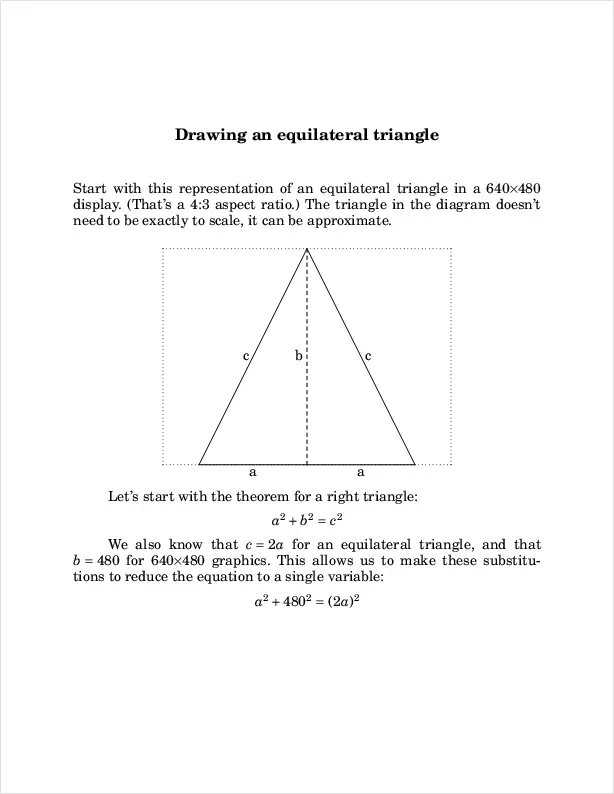
Stacking related equations
When describing a series of equations, you may find it useful to
align two or more equations, such as "stacking" the equations so the
equals sign remains in the same place. In LaTeX, you might use an
eqnarray, but eqn provides a simpler method:
use the mark keyword to indicate the symbol that should be
used to align the equations, and the lineup keyword to line
up following equations to the marked symbol.
Let's look at a practical example. We might further simplify the last
equation to expand
as
.
We can line up two equations to the equals sign with mark
and lineup:
.EQ
a sup 2 + 480 sup 2 mark = (2 a) sup 2
.EN
.EQ
a sup 2 + 480 sup 2 lineup = 4 a sup 2
.EN
The mark remains in place until it is reset with another
mark statement. For example, we could continue to resolve
the equations through simplification, using mark and
lineup to align paired equations:
.PP
Solving for $a sup 2$, we can further simplify the expression as:
.EQ
4 a sup 2 - a sup 2 mark = 480 sup 2
.EN
.EQ
3 a sup 2 lineup = 480 sup 2
.EN
.PP
This resolves the final calculation for $a$:
.EQ
a sup 2 mark = { 480 sup 2 } over 3
.EN
.EQ
a lineup = sqrt { { 480 sup 2 } over 3 }
.EN
The last two equations show other formatting: use the
over keyword for long-form division, and the
sqrt keyword for square roots. Use the { }
brackets to group statements together, such as to put
on top of the division. This formats the first equation as:
Let's bring the full document together one more time for final formatting:
.ds FAM N
.nr PS 14
.TL
Drawing an equilateral triangle
.LP
Start with this representation of an equilateral triangle in a 640\[mu]480
display. (That's a 4:3 aspect ratio.) The triangle in the diagram doesn't
need to be exactly to scale, it can be approximate.
.PS
box dotted wid 4 ht 3;
line "c " rjust from last box.n down 3 left 1.5;
line "a" below right 1.5;
line "a" below right 1.5;
line " c" ljust up 3 left 1.5;
line "b " rjust dashed down 3;
.PE
.PP
Let's start with the theorem for a right triangle:
.EQ
delim $$
a sup 2 + b sup 2 = c sup 2
.EN
.PP
We also know that $c = 2 a$ for an equilateral triangle, and that
$b = 480$ for 640\[mu]480 graphics. This allows us to make these
substitutions to reduce the equation to a single variable:
.EQ
a sup 2 + 480 sup 2 mark = (2 a) sup 2
.EN
.EQ
a sup 2 + 480 sup 2 lineup = 4 a sup 2
.EN
.PP
Solving for $a sup 2$, we can further simplify the expression as:
.EQ
4 a sup 2 - a sup 2 mark = 480 sup 2
.EN
.EQ
3 a sup 2 lineup = 480 sup 2
.EN
.PP
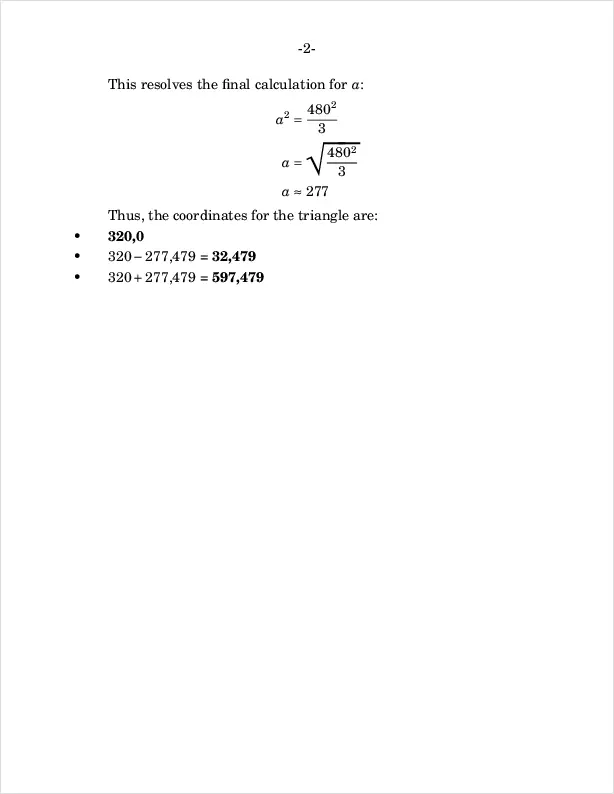
This resolves the final calculation for $a$:
.EQ
a sup 2 mark = { 480 sup 2 } over 3
.EN
.EQ
a lineup = sqrt { { 480 sup 2 } over 3 }
.EN
.EQ
a lineup approx 277
.EN
.PP
Thus, the coordinates for the triangle are:
.IP \[bu]
.B
320,0
.IP \[bu]
$320 - 277$,479 =
.B
32,479
.IP \[bu]
$320 + 277$,479 =
.B
597,479
The result is a set of equations that are properly aligned and easy to read:
$ pdfroff -ms -e -p triangle.ms > triangle.pdf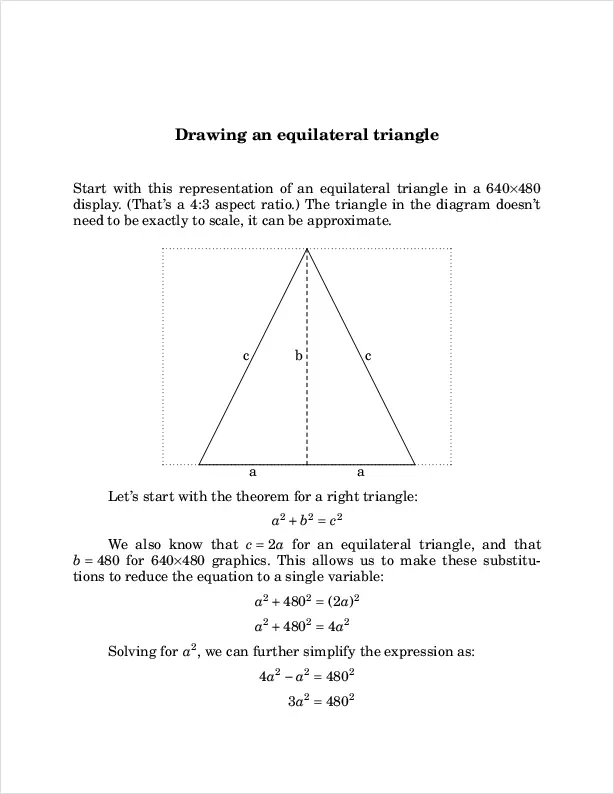
Equations made easy
I like using eqn for equations in scientific writing.
Some may prefer LaTeX, but I just find eqn works very
naturally for me.
To learn more about how to typeset equations in troff documents,
start with the classic article A system for
typesetting mathematics (1975) by Cherry and Kernighan, which
provides an excellent overview for its capabilities. The
eqn(1) man page has more information, including a helpful
"Examples" section.

Jim Hall is an open source software developer and technical writer, including projects such as open source usability and the FreeDOS Project. At work, Jim is CEO of Hallmentum, an IT executive consulting company. | Check out Jim's new book From Markup to Markdown (available now) about important milestones in writing with computers, including nroff, LaTeX, HTML, and DITA.