 What’s coming in LibreOffice 26.8
Some interesting user interfaces are coming in the LibreOffice 26.8 update
LibreOffice is an open source office suite for Linux, Mac, and Windows. At Technically We Write, we focus on the powerful and flexible word processor (LibreOffice Write) but LibreOffice also includes other standard office suite features including a spreadsheet, presentations, drawing, and database.
Since January 2024, LibreOffice identifies its releases using a year.month label, with new major releases about every six months. The current version is 26.2, released in February 2026. The next version will be 26.8, and should be available in late August 2026.
Recently, LibreOffice teased new user interface improvements coming in LibreOffice 26.8, including updates to the tabbed user interface. We reached out to LibreOffice to learn more about what’s coming.
Let’s start with an introduction. What’s your role at LibreOffice?
My name is Heiko Tietze. I was born in 1970 in East Germany, and studied psychology with focus on experimental psychology and psychophysiological methods. I finished with a PhD thesis about "Neuronal representation of conceptual knowledge."
I worked at an "institute for traffic science" about detecting tiredness, then at an "institute for communication, information processing and ergonomics" about situation awareness in defense context, and ultimately at a company focused on usability for different clients (finance/banking, fire department supplier, medical devices, and so on).
I started around 2014 to work for LibreOffice, and today I work full-time as a UX Mentor at The Document Foundation.
We’re looking forward to a user interface update in LibreOffice 26.8, in late August. What can we expect?
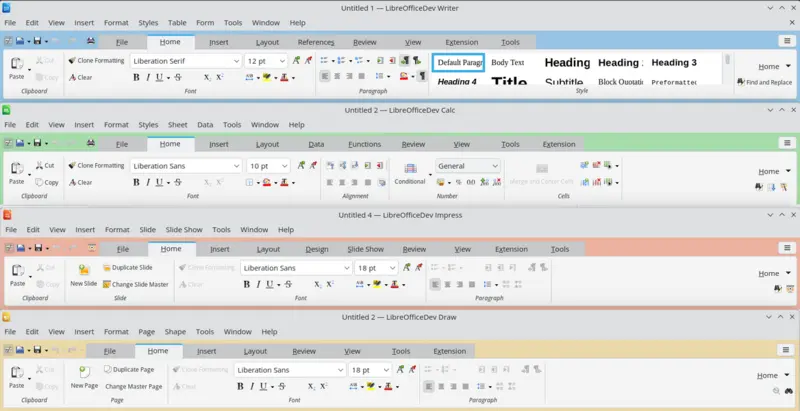
There will be many user interface improvements and changes in LibreOffice 26.8, which are described in this wiki page: ReleaseNotes/26.8 at the Document Foundation Wiki.
The image that caught your attention is showing the new Notebookbar background, which is now colored individually per module. The colors are hard-coded for now, and are merged with the background to work on both dark and light themes. They are controlled via expert configuration.
The new design also adds margins/padding, category labels, and restructured content. This should make it easier to find the actions, while the module-specific colors are probably a design touch that make users feel more at home.
This is probably the most significant single new change to the user interface, but there are many smaller changes which are significant for users, like the possibility of editing pre-built table styles in Writer and Calc, or the maximize button for resizable dialogs on Windows.
What was the process behind the user interface update?
The discussion about improvements started as soon as the Notebookbar was released, but it took several years - and some discussion on Bugzilla, where the community is usually discussing new features or improvement requests - before the change was applied. I was the author of the patch that enabled the change. Of course, the discussion on Bugzilla was the visible result of other discussions on the design chat.
The number of LibreOffice users who know and use the Notebookbar is increasing, even if there is still a large number of users who do not search for user interface alternatives and do not change the default user interface with icon bars and sidebar. We are encouraging people to be curious about LibreOffice user interface options, because we think that offering alternatives which fit different user profiles is better than imposing a single user interface. Unfortunately, users of proprietary software are not used to the flexibility and the different options of open source software.
We use a few personas for UX discussions, which can be found on the wiki.
These personas are not verified with (classic) usability tests (interviewing users takes time and requires to focus on only a few features) but we do surveys from time to time and ask demographic questions.
For academia, this survey which tries to base personas on real user data might be interesting: Motifs as an empiric source for personas at the LibreOffice design blog.
Most of the user input comes from Bugzilla and other platforms such as ask.libreoffice. Here, many users are asking questions about the user scenario and user cases.
Although we do not run specific usability or user experience tests, we provide daily builds of LibreOffice, which can be used to test new UI features.
How can others contribute to LibreOffice design?
At The Document Foundation, the website design team and the UI/UX design team are different. To join the UI/UX design team, the best way is to follow the suggestions in this wiki page: Welcome to the Design and User Experience team (under "Get In Contact"). No specific skills are needed to join the weekly meeting or to comment on tickets flagged as needUXEval (this is done by QA on user requests).
More experienced users can solve easyhacks starting from changing menus/toolbars (simple modification of XML files) to more complex tasks.
Icon design and artwork is also needed (but apparently simple tasks are often difficult, thinking about templates that, when saved, store too much data to work in every scenario: for instance, fonts used might not exist).
Going back to the Notebookbar, it would be interesting to learn what functions users need most in specific situations.
Thanks to Heiko for discussing the upcoming user interface changes with us. I’m very excited to try out the new release. LibreOffice 26.8 should be available in late August 2026. Learn more at the LibreOffice.org website.

Technically We Write is a community of technical writers, technical editors, copyeditors, web content writers, and all other roles in technical communication. We'd love to share your story! Contact our editors to share your article idea.